Stop Spreadsheet Hosting!

Are you still managing your entertaining events with numerous spreadsheets, random Menu notebook entries, and "best-guess" memory?For those who love to entertain, the most vital details often get lost in scattered manual jottings and fragmented records.
Introducing ...
nectar and nest app

Gather the Plan. Nourish the Moment. Note the Memory.
Nectar & Nest is the digital evolution of traditional entertaining Plan Book, Menu Notes and Guest Spreadsheets combined into one.
It is a dignified, intentional space designed specifically for the host who values the "Who, When, and Where" of every gathering.
Move your social history out of office tools, and your head space, and into the dedicated, permanent record it deserves.
Nectar & Nest has been created for our Community out of the need for a more unified and streamlined approach to Entertaining and Menu record keeping along with the general preparation for guests while reducing the mental load that comes with entertaining.
READY TO START HOSTING?
APP SAMPLE SCREENSHOTS:
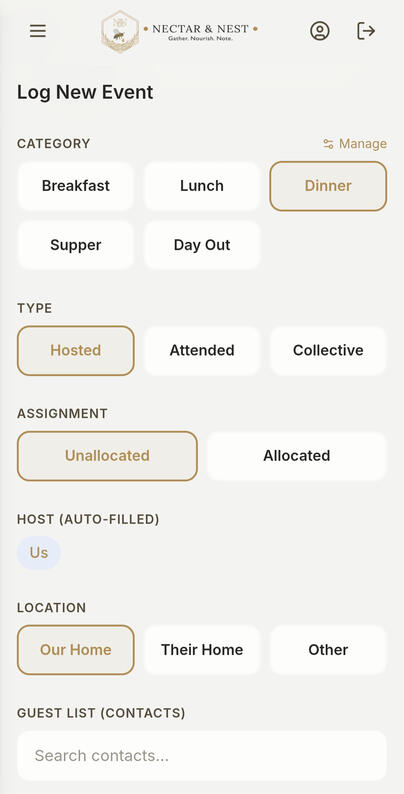
Log New Event - quickly update your records with a touch, type & save
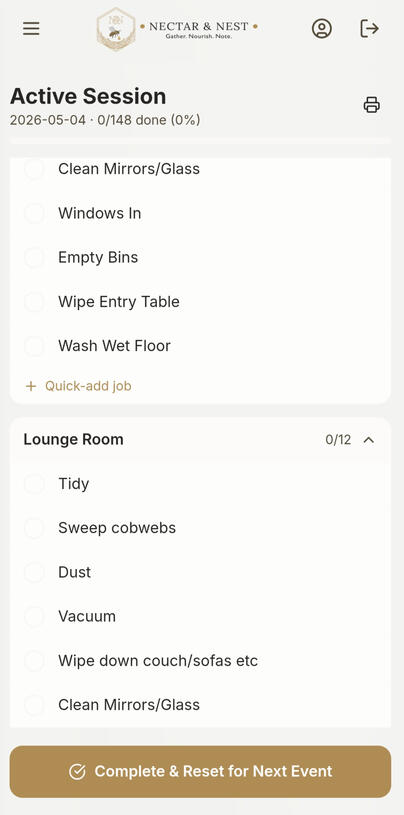
Extensive, yet fully customizable, Task List that you just double tap each job in each area to cross off.
*Premium Plan only. See Premium Features for more details
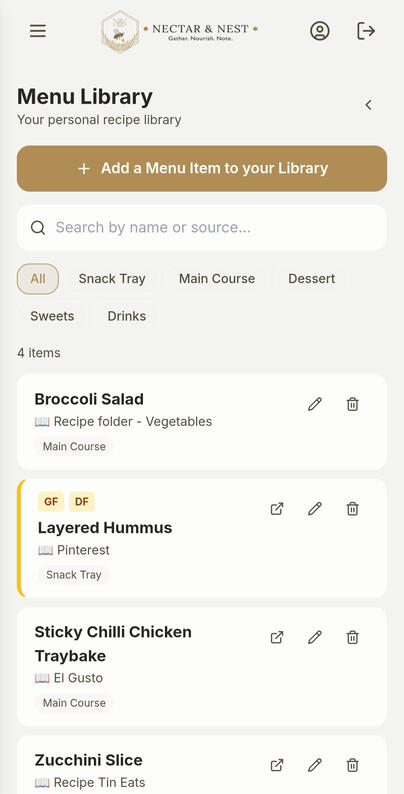
Your Menu Planning in one spot - 3 part feature. Your digital Menu Item Library and your Menu Planner page.*
*Premium Plan only. See Premium Features for more details
The app homepage shows you at a glance your personal hosted events logged based on your “Home Base” locality and other contacts added that are the same locality as yours.Events will only start showing in these timelines as you create, and, add new events with people listed in the app as in the same locality as you.You can click back years by tapping on the year, and scroll sideways to others if needed.
READY TO START HOSTING?

ENTERTAINING DIARY
The main purpose of the App is to give you a new digital diary for all your logged Entertaining events.
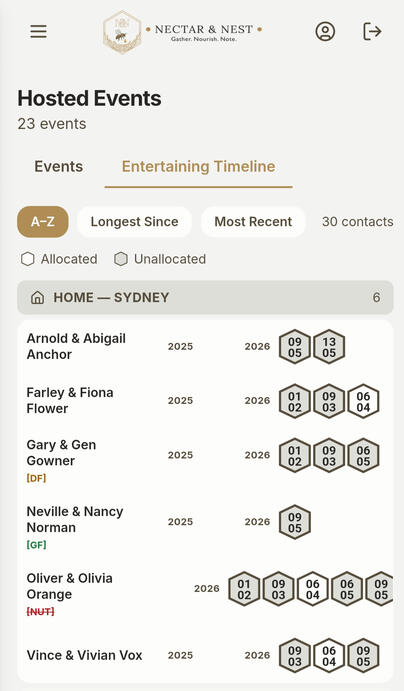
Entertaining Timeline
This timeline updates as you enter your entertaining events.
See at a glance who you had when - ensure no one slips through the cracks.
Switch between A-Z, Longest Since and Most Recent to have the app show these . Great to check you've had everybody locally.
Be it an event you’ve Hosted, or Attended, or maybe a Collective get together. Log if it’s Lunch, Dinner or a whole Day Out. Note whether it’s an Allocated or Unallocated event.
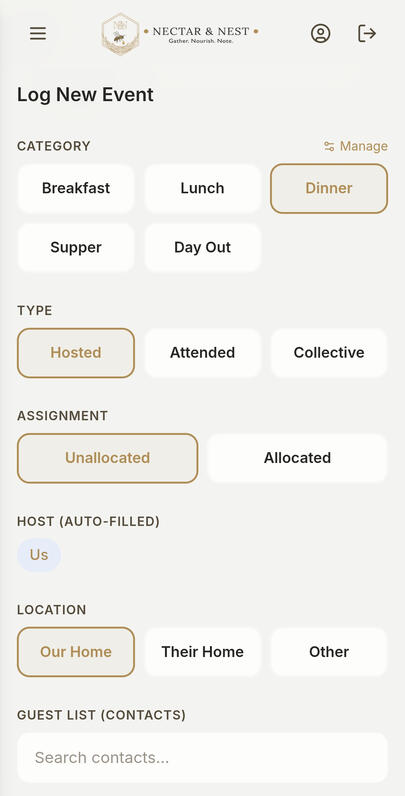
If you select an event as Hosted, the app will automatically set you as host and location as "Our Home", and if you select event as Attended, the app will automatically set the location as "Their Home", and add you as a guest. You will still need to add the hosts name. The location places can still be changed if the event happened to be located somewhere else, such as a river or hall etc.
N&N App also “remembers” your added locations, so you won’t have to re-type “Backwoods River” every time you share a meal with others there.Enter, and select, all the details in one space and let the App work its intelligence by filing these event cards tidily away and updating your Entertaining Timelines.Easily access older event cards by our search bar where you can search a name, location etc. to bring back old record memories.
There is also a photo section for each event for you to add up to 4 photos. Use this section to note any special memories etc.A bonus tip for those on the Standard Plan: you can use this section to take a photo of your written menu and attach it to your event here to record what you served at that event.
Connect through to your Menu - Premium Plan only!
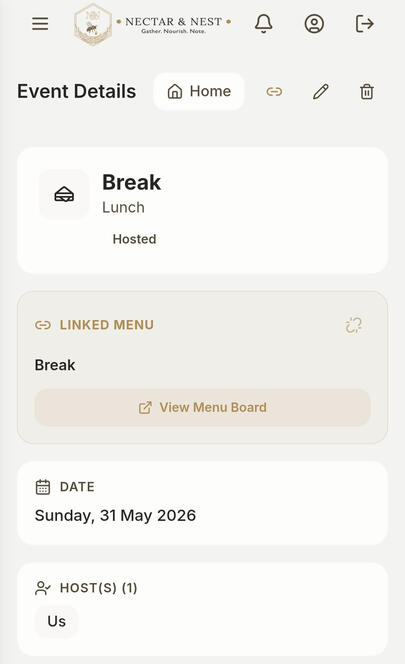
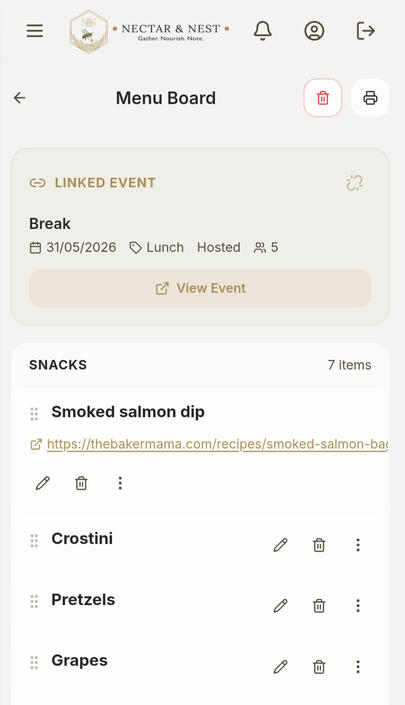
You can now link your Entertaining Event card and Menu Board so you can easily click through from one record to the other.
An easy straight forward way to quickly see the "other half" of the Event details.

Personal Contacts Library
The other half of Nectar & Nest is your private Personal Contacts Library—a dignified, intentional digital library built entirely around your personal contacts, adding your hosts or guests can be as effortless as tapping a name.
As you type, the app instantly scans your Contact library to give you a seamless type, tap, and select experience.
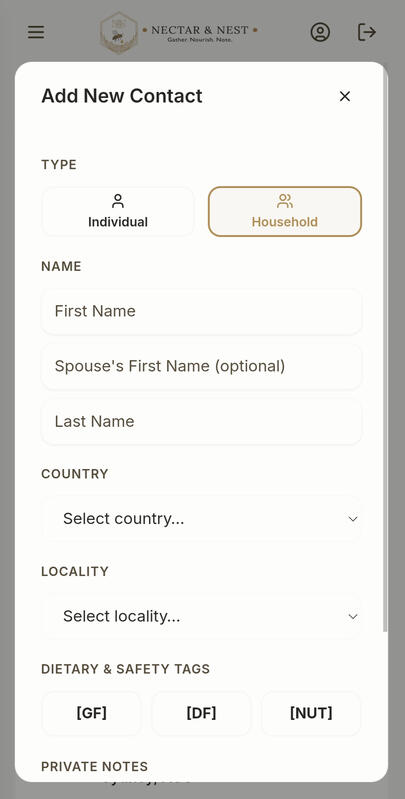
If you are entertaining someone new, an "Add Contact Card" pop-up appears instantly, letting you create a fresh record right then and there without ever breaking your hosting flow.
Tailored Hospitality Details
Every household in your library features a dedicated Contact Card designed to help you honour your guests' unique needs with absolute grace.
Core Dietary Chips: Tag the three most common dietary requirements with built-in option selections: GF (Gluten-Free), DF (Dairy-Free), and
NUT(Nut Allergy), or use the Personal notes section for other dietary requirement notes.Personal Hosting Notes: Keep track of the little details that make people feel seen, right on their card (e.g., "John plays the piano" or "Bob loves sparkling water").
Note how many Adults and Children to assist with your Menu proportions.
ADDING CONTACTS
Tap the "Personal Contacts Library" button
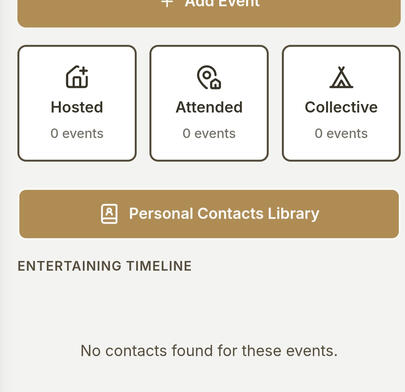
Tap the (+) button to the right of the search field to open the New Contact card
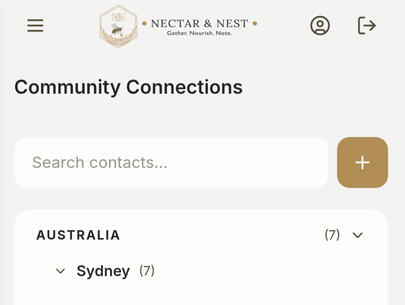
Select between Household and Individual. Choose household for 2 or more members, this opens the needed fields to add relevant details.
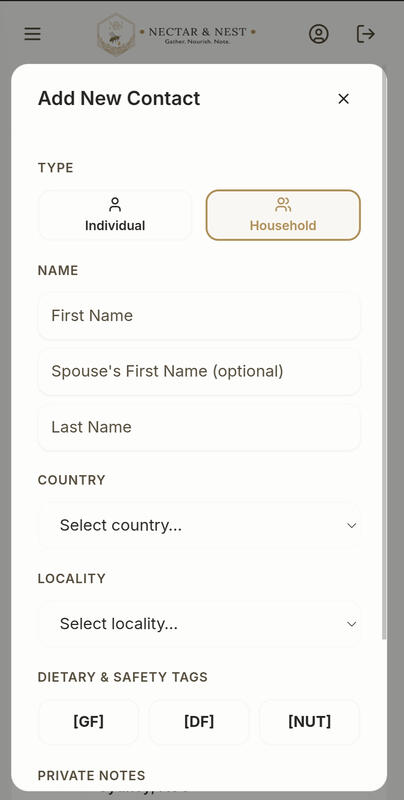
Fill in the first name of primary householder, and the first name of the secondary householder. If a single parent household, the second name field is optional
Fill in household Last name
Select their country from the drop down list
Select their locality from the drop down options
Tap any of the three dietary notes if needed. This will give you a small note to remind you of any of these needs to consider when planning menus etc
Adjust the Adult and Child numbers to match that household.
Add any personal notes. Good to remember when you have a musical guest coming
Tap "Add New Contact" button and the app will remember this for future use
You can edit and/or delete any contact whenever you'd like.
Any Contacts selected that are in the same locality as your set Home Base locality will register in your home locality Entertaining Time lines.
Desktop Tip - Faster Contact Input
Nectar & Nest is a web-based app, so you can use it seamlessly on your desktop, laptop, tablet, or smartphone.
If you're adding a large number of contacts to your Personal Contact Library, you may find it much quicker and easier to do so from your computer using a full-sized keyboard.
Once your contacts are saved, they'll be instantly available across all your devices—ready to use whenever you're planning your next gathering.To access the app via a laptop, just use the link below on your laptop to access your app in your web browser.
Your Contacts, Events, Menus etc. Your Privacy. Your Responsibility.
Your social and entertaining history belongs to you. Every contact card, custom note, and dietary entry, all your Events, Menus, Task Lists etc. are entirely private and secure to your individual account.Nectar & Nest values your trust, and no personal details, contact information, or sensitive hospitality preferences are ever shared from the App.
Any, and all, details are your information and your responsibility.Nectar & Nest is designed so that only you have access to your personal events, contacts, menus or household information. We manage the platform—not your memories.

THE PREMIUM PLAN FEATURES
While the Standard Plan features give you your Digital Diary to track your history, these Premium Plan features, not only include these Standard Plan features, but will move you from recording to active planning.
Extensive Task List: Detailed, organized task management to ensure your home is ready for your guests' arrival.
Feature-Forward & Highly Interactive 3 part Menu Planning Section: Dedicated menu builders and multi-stage preparation lists.
The ability to link your Entertaining Event card and your Menu Board for that Event.
List Printing: This gives you the ability to print out your lists and menu for if you like a hard copy.
For more details about each Premium feature, click on corresponding button in the footer

TASK LIST
Extensive, yet fully customizable, Task List that you just double tap each job in each area to cross off.
See your progress bar grow as you tick off your jobs while getting ready for your upcoming Hosted Entertaining Event.
N&N App provides a default task list where you can add/rename/delete areas, add/rename/delete individual jobs within those specific areas, drag and drop areas to suit your personal layout, etc.
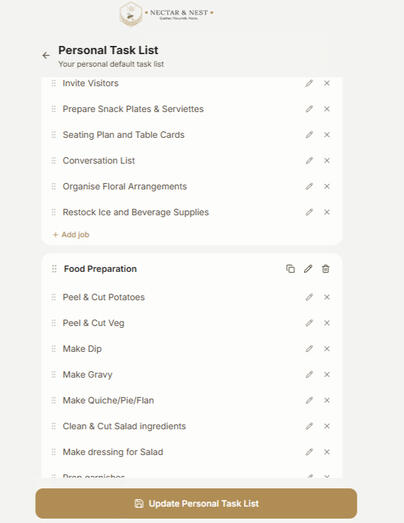
TO START, (and for updating your Task List):
Initially, when you click into this feature, you will have the section to tap to "Reset Task List from App Default", tap this and the app will load our default task list with area blocks and the individual task within each area.
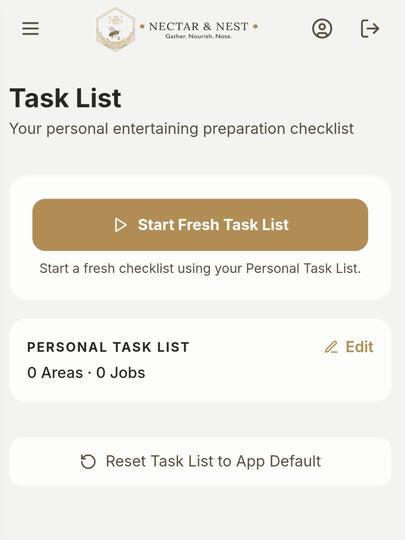
Once this has loaded, go ahead and edit your Task List to suit every room and area and those corresponding tasks within for your personal house requirements to help you to get ready for guests, or just a routine clean.
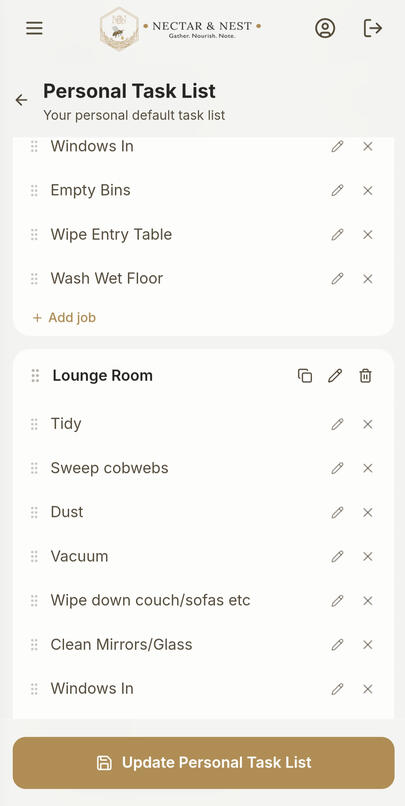
AREA BLOCKS:
1) Tap the little two page icon at the top right hand corner of the area block you want to duplicate. This is where you add more areas to your task list by duplicating that whole block, with those corresponding tasks, and puts it below the current block
2) Tap the pencil icon to rename an area block. Guest Bedroom, Upstairs bathroom etc...
3) Tap the little trash can to delete an area block
4) Drag and drop any area blocks if you wantINDIVIDUAL JOBS (within the area blocks):
1) Tap the X to the right of the individual job to delete this job
2) Tap the pencil to rename this job.Hit the Save and Update button.
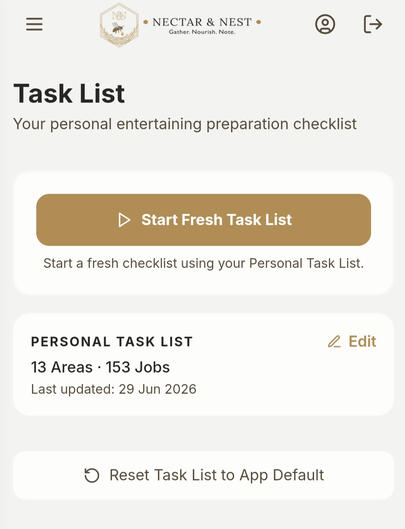
App will use this Task List as your personal Task List going forward until you decide to edit it further.
As you work through and complete area blocks, you can collapse that block to narrow down where you still have jobs to complete.
If you make a mistake, you can always reset your list back to the App default Task List, make your custom changes and re-save your new Personalized Task List.
Your Task List. Your Way.
Every household has its own way of preparing for guests, which is why Nectar & Nest's Task List is designed to provide flexible tools that adapt to your personal workflow—not the other way around.Create your own sections, rename headings, add or remove jobs, reorder tasks with simple drag-and-drop, and organise everything in the way that makes the most sense to you. Whether you prefer to work room-by-room, by priority, or in a countdown leading up to your event, your Task List can be personalised to suit the way you entertain.
If you have certain jobs that are for a break/dinner, create a new block for each and add in your personal jobs.
Room by room
Week Prior • 3 Days Prior • Day Before • Day Of
Break vs Dinner
Shopping • Food Prep • Cleaning •
Or any workflow that suits your household

MENU PLANNER
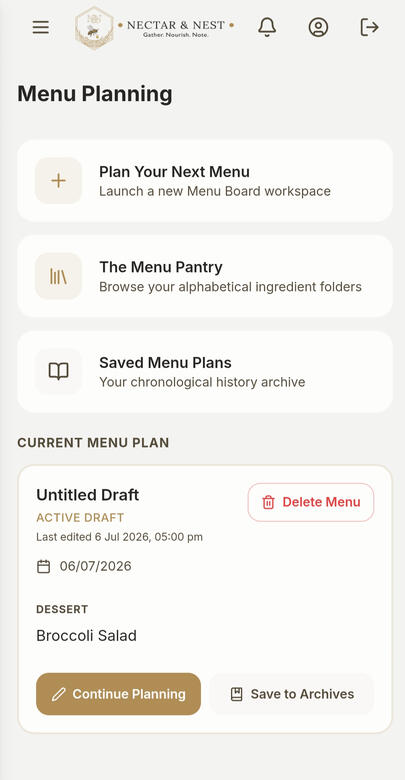
This is a comprehensive interactive 3 part section for maximum food planning and preparation, and menu recording
1: Plan Your Menu - Here’s where you can plan your Menu for an upcoming Event.
2: The Menu Pantry - Your personal individual menu items collection.
3: Saved Menu Plans - Your past Menu Cards with details at-a-glance. Link, Duplicate, Edit and/or Delete for more functionality.
Craft the perfect dining experience for every gathering.The Plan Your Menu workspace allows you to map out your courses chronologically from arrival snacks to late-night treats, and drink options to suit.Put in your upcoming Entertaining Event details, set the Date of the Event, select if it's a Hosted or Collective Event type, choose the Event Category and start your plan.
1) The Menu Board -
Tap "Plan Your Next Menu" to start a new Menu Board and fill in the Event details including your guests.Type your culinary ideas on the fly, or effortlessly pull pre-saved dishes and menu items directly from your Menu Pantry with a single tap.You can easily just double tap to select multiple items straight from your "Menu Pantry" and back to your Menu Board.
From inside the Menu Planning section, select "Plan Your Next Menu.
This will open your Menu Board, fill in your event details, such as an event name, the date, event type and category.
Type/tap and select your guests, this will pull from your Personal Contacts Library. If these aren't confirmed yet, you can always edit them in later.
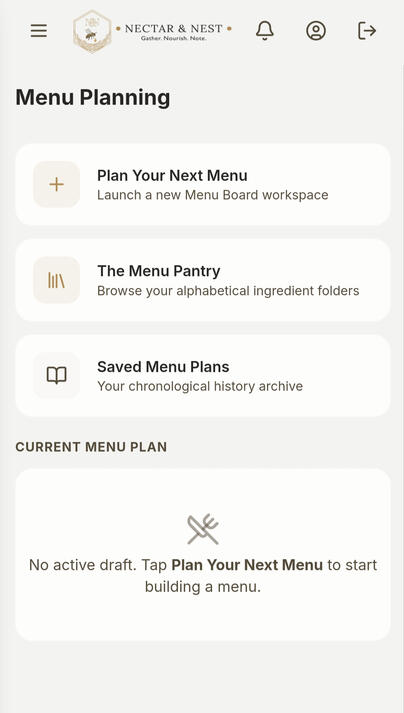
Go through and add your items into each Course either via the "+ Add Item" or "From Menu Pantry" buttons.
The option to add From Menu Pantry will open your Menu Pantry and the course that you clicked through from, from here you double tap to select as many items from that course to add to your current Menu Board.
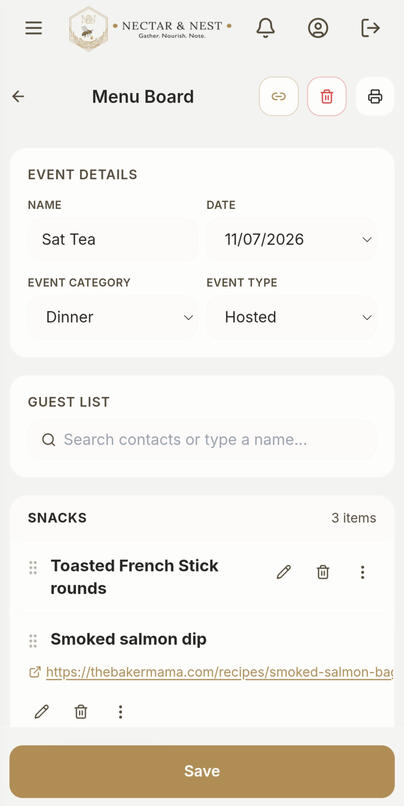
The +Add Item option will open the same input card as for adding an item to your Menu Pantry, but this means you can add an item on the go without clicking back and forth. This item/recipe will automatically save from your Menu Board back into your Menu Pantry for future use.
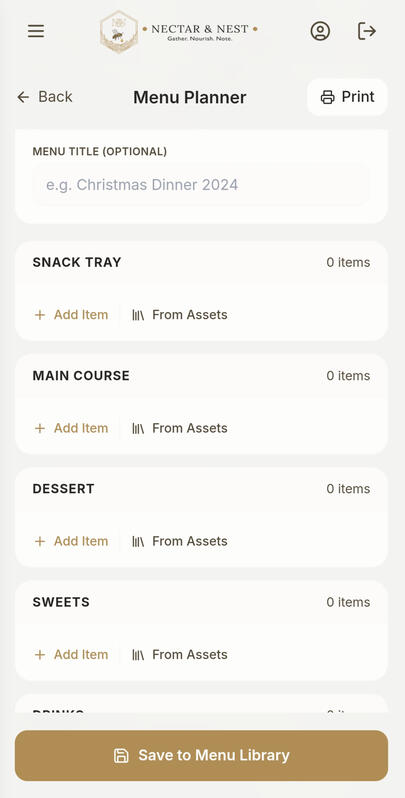
Sections for you to add your Snack Tray, Main Course, Dessert, Sweets, and Drinks items, and then save to the Saved Menu Library for future reference.
Add up to 6 photos to remember how you set the table, how you plated a dish or other records to attach to that event
Save Menu either as a Draft or to Archives.
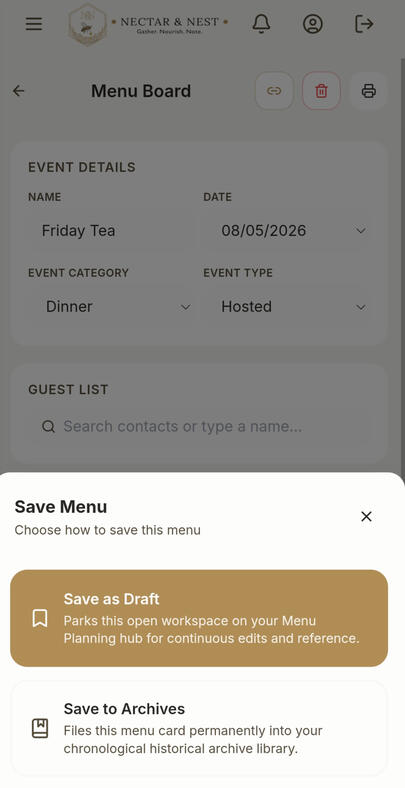
If you select Save as a draft - this will save your current, or 'Active', Menu Board to the homepage inside your Menu Planning section for quick and easy access, and to make any further edits etc. that you may want to make before saving it through to "Saved Menu Plans
If you select to Save to Archives, this will save this current Menu Board straight to your Saved Menu section for future reference.
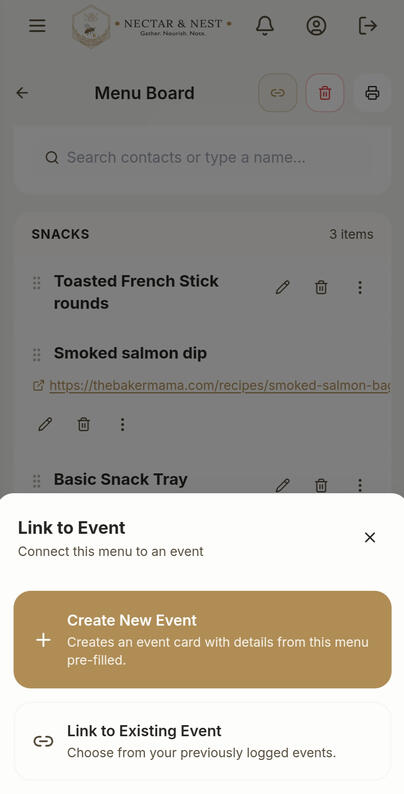
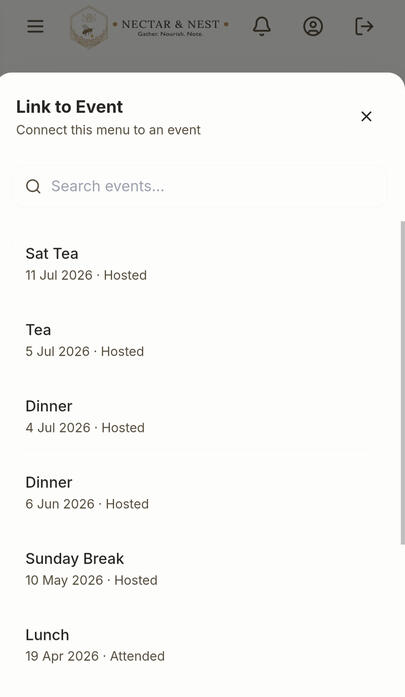
You will also get the option to link to a New Event or an Existing Event.
2) THE MENU PANTRY -
Your personal library of individual meals and dish items, along with your recipe books and recipe sources.This feature makes it quick and easy for you to just tap and select to add items to your next Plan Your Menu card. Once again, no more retyping the same things every time you reuse an item/recipe.
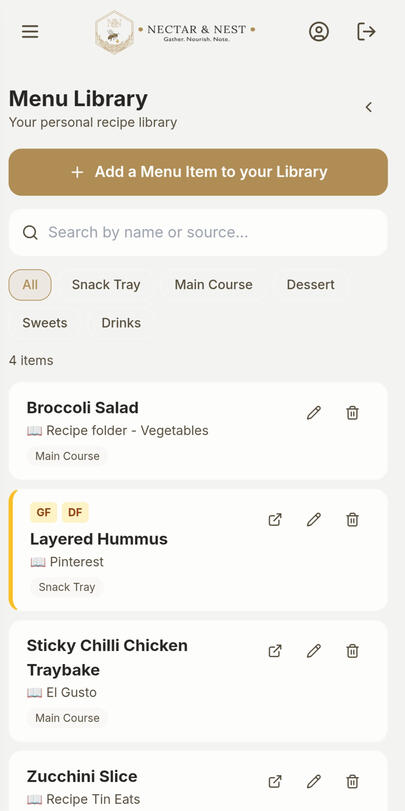
Do you often use a recipe from a family recipe book or magazine? Note the book and page and other details in the Source field.
Or maybe a favourite dish from ElGusto, Pinterest or just online somewhere? Just copy and paste the website to the Web link/ Social Handles field for a quick easy tap through to the recipe.
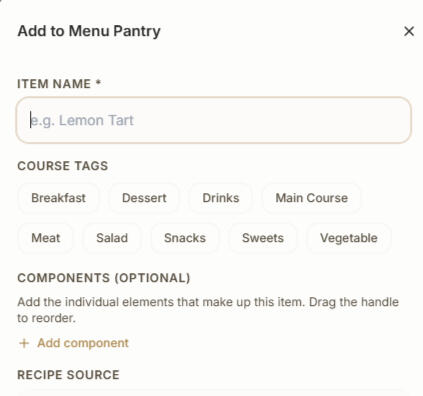
When you add an item to your Menu Pantry, tap any of the course tags to what you will associate with this ingredient and/or recipe. You can select multiple.The app will automatically allocate the corresponding Course Tag with your new item to the Course that you clicked through from the Menu Board. You can use other tags as well.
NEW FEATURE - COMPONENTS - A place for every little detail
Whether you're planning a simple snack platter or a meal with several accompaniments, Components helps you keep the individual elements of each menu item together.
Add your Components
When creating or editing an item in Menu Pantry or on your Menu Board, select + Add component to list its individual elements. Drag to rearrange them into your preferred order.
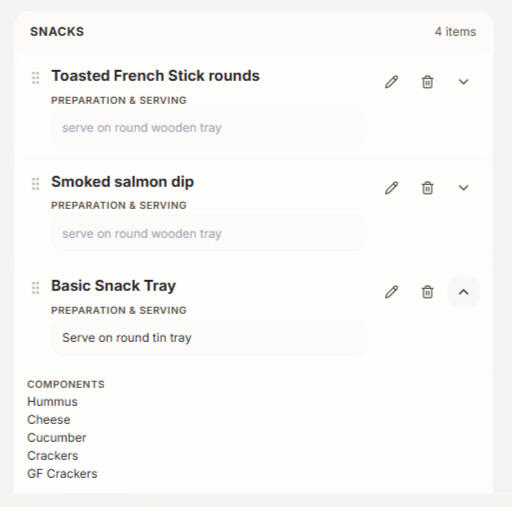
See everything at a glance
Expand a menu item on your Menu Board to reveal its Components, alongside any Notes or Preparation & Serving information.
Make it your own
When you bring an item from Menu Pantry into a Menu Board, its Components come with it. You can then tailor them for that particular occasion without changing your original Pantry item.Your customised Components are also preserved when you save your menu for future reference.
3) SAVED MENU PLANS -
Your past Plan Your Menu Cards with details at-a-glance.Never forget a great menu combination. A dedicated click-through archive houses your entire historical culinary timeline, beautifully sorted with your most recent events at the top.You can duplicate a previous Saved menu to re-use again for a new Event without having to add all the Menu Board items again, just fill in the new Event details such as Heading, Date, Guests etc. then make any modifications to it for quick Menu planning.
Deep Archive Search: Instantly search your past events by typing a specific dish name (like “BBQ Brisket”) to remember exactly how you paired it.Smart Filtering: Effortlessly sort your culinary history by Event Category (Breakfast, Lunch, Dinner) or date ranges to find inspiration for upcoming gatherings in seconds.
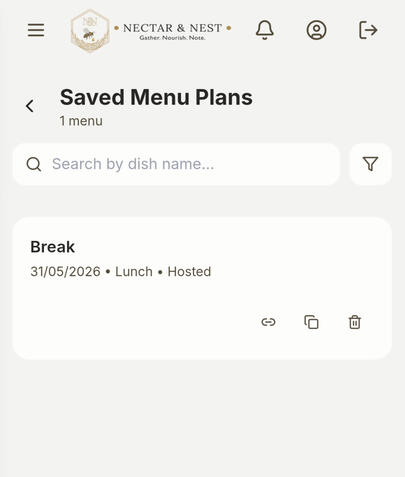
Icons and their use:
When a Saved Menu is tapped on, it will expand and show these 4 icons shown to give you further use.
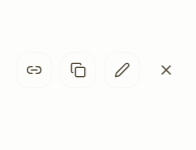
1) "Link" this is where you can Link this Menu Board to an Event for cross reference
2) "Duplicate" icon and this is for if you would like to re-use the same Menu Board. Tap this and the app will duplicate it into a New Menu Board ready for you to add the new Event details and make any changes to it before saving for use. It leaves the original one with those details in your Saved Menus.
3) "Edit" icon, where you can tap this to open this particular Menu and make any changes to it and then resave it with those updated changes. This is where you delete that Menu from if you want to.
4) "Close" icon to close that Menu Board and return to the Saved Menu Section. It does not delete the menu.
Link your Menu through to your Event
This is where more of the magic happens!
You can link your Menu Board and Entertaining Event card so you can easily click through from one record to the other.
An easy straight forward way to quickly see the "other half" of the Event and Menu record, and to see what you served who last time.

SUBSCRIPTION PLANS
Choose Your Hosting Journey
Whether you are looking for an simple but elegant digital archive to remember your social history, or a powerful, automated suite to run your busy kitchen, home and meal logistics, we have a plan designed to honor your preference.
All new user get a 30-day free PREMIUM plan trial to be able to get a look around the app in its entirety. You'll still need to select your desired Plan and Billing Schedule at the time of account creation but billing, and payment, won't start till after the 30-days.
STANDARD PLAN -
Monthly Subscription $7.99 /month
Annual Subscription $80/year
Save the equivalent of 2 months when billed annually
Billed as one payment of $80 annually
The essential digital diary for a permanent timeline of your gatherings to easily reference your personal network.
The Entertaining Diary: Access your full historical timeline and interactive Event Cards to log every gathering.
Personal Contacts Library: Build your secure, personal directory of households and individuals. Add dietary needs tags and custom personal touches on the go.
Privacy First: 100% secure, local-to-your-account data isolation.
PREMIUM PLAN -
Monthly Subscription $14.99 /month
Annual Subscription $150/year
Save the equivalent of 2 months when billed annually
Billed as one payment of $150 annually
The complete, stress-free hospitality ecosystem. Designed for those that like a comprehensive system to track and record all the details and logistical preparations that come with entertaining.Includes Everything in the Standard Plan, PLUS:
Extensive customizable Task List: Streamline your prep with our multi-tier task engine, featuring a 1-tap layout reset so you never have to rewrite a checklist twice. Or just use this as your regular weekly cleaning schedule.
The 3-Part Menu Planning Culinary Suite: A powerful, interactive and dedicated dashboard built entirely for menu and food management:
- 1) Plan Your Menu Board: Chronologically map out your courses, from welcome drinks to desserts.
- 2) The Menu Pantry: Your personal menu item and dish library. Think of your kitchen cupboards, fridge and recipe book collection in one place. Store individual dish details and links from Pinterest pins, web URLs, or Instagram handles so you never lose an inspiration. You can easily just tap through to the recipe to open it in a new tab on your device browser.
- 3) Saved Menu Plans Archive: A searchable, filterable timeline of past feasts. Instantly locate a previous menu by typing a single component (like "Banana Cake") or filtering by event category.
- Link your Menu Board and Entertaining Records together for a seamless click through process to view the other half of your event/menu.
The "Print List" feature gives you the ability to be able to print your lists, with or without notes and recipe sources, if you'd like a hard copy for reference.
Important Subscription & Billing Terms:
30-Day Free Trial: You will not be billed during your first 30 days. You can cancel anytime inside your app account settings before day 30 to avoid being charged.Billing Option: Subscriptions are billed on a recurring basis according to your chosen plan frequency (Monthly or Annual).Upgrades & Cancellations:
- Plan Upgrades: You can upgrade your plan (e.g., from Standard to Premium, or Monthly to Annual) at any time. Upgrades take effect immediately, and any unused time on your current plan will be automatically prorated and credited toward your new Plan/Billing option!
- Cancellations & Refunds: You can cancel your subscription anytime inside your account settings to prevent future renewals. However, once a billing cycle begins, payments are non-refundable, but your app access will remain active through the end of your current paid period.Support Contact: Need help? Reach out directly via our Contact Us page or email us at [email protected].
READY TO START HOSTING?

HOW TO GET STARTED
How the Nectar & Nest Beta App is Different
Unlike traditional apps found in the Google Play Store, Nectar & Nest is built using advanced Progressive Web App (PWA) technology.Here is what makes it different and the benefits this has:
No App Store Required: You don’t need to browse the Google Play Store, manage storage space, or deal with continuous, bulky app updates.
Instant Access & Light Weight: Because it runs securely on modern web infrastructure, it takes up virtually zero space on your device while loading instantly.
The Full App Experience: Once saved to your device, it launches in full-screen mode, hiding the mobile browser address bar and navigation buttons so it looks, feels, and functions exactly like a native app.
With having web access as well, the user gets the ability for easier bulk input of Personal Contacts and Menu Items etc.
For full directions to set this up on your phone, please see our directions further down the page.
A) Download and install the app
This procedure is best done on your phone*.
1) On your phone, click the “Launch App” link
2) Down by Need an account? tap on “Sign up”.
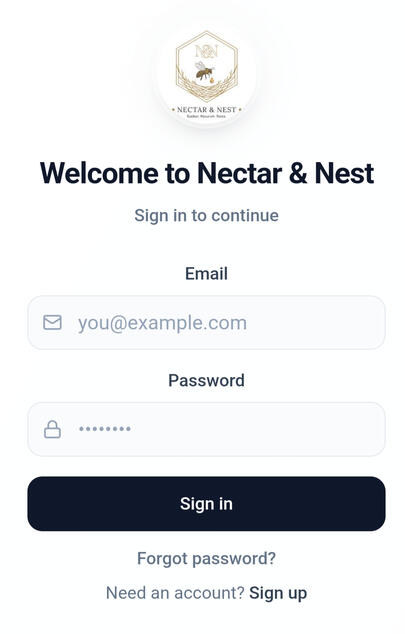
3) Enter your email address and a password. You will then get sent an email verification code to your email address. Copy this from your email and paste it back in the Sign in section.
4) You will then get taken to the Subscription Page. This is where you can choose which your Subscription Plan and Billing option. Click on your option and you will get taken through to your Customer Billing where you confirm your subscription and billing, put in your payment details. This will then apply our 30-day free trial of Premium Plan and then take you back to the app to the Set Up Home Base.
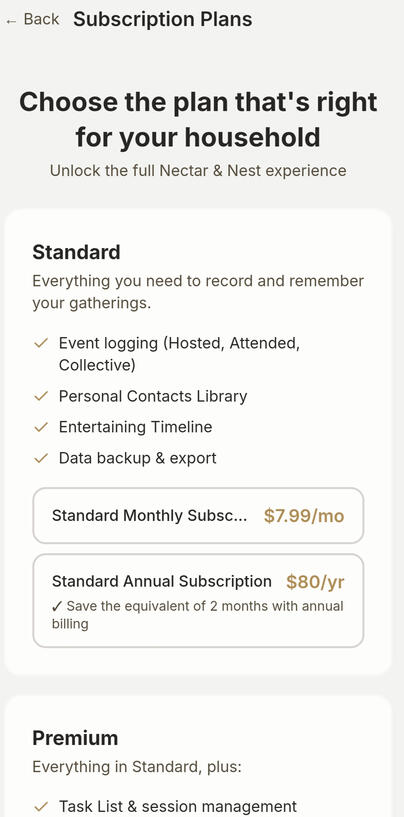
5) Set Up Home Base page. This is what the app uses to configure your Entertaining timelines and "Home" locality in Events logged.
B) Set Up Your Home Base
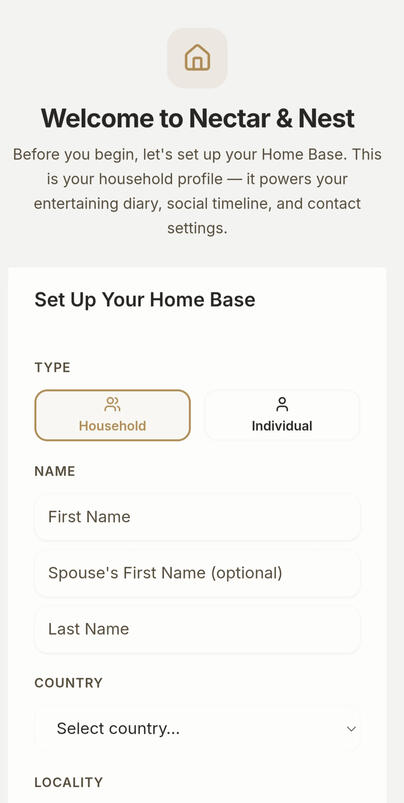
6) Fill in your household details. If you have a household with 2 or more members select “Household”. This will then give you the ability to add both householders names (if applicable), and the app will recognize that it is a household
7) Type in Husbands first name, then Wife's first name followed by family Last Name. If your have a single parent family, just type your name into the first Name field and leave the Spouse's First Name field blank.
8) Select your Country, then Locality from the dropdown lists. The app uses these settings as your Home locality for the Entertaining Timelines to work
9) Change Household member count to reflect your household numbers.
10) Tap Save to format and update your personal Home Base details.
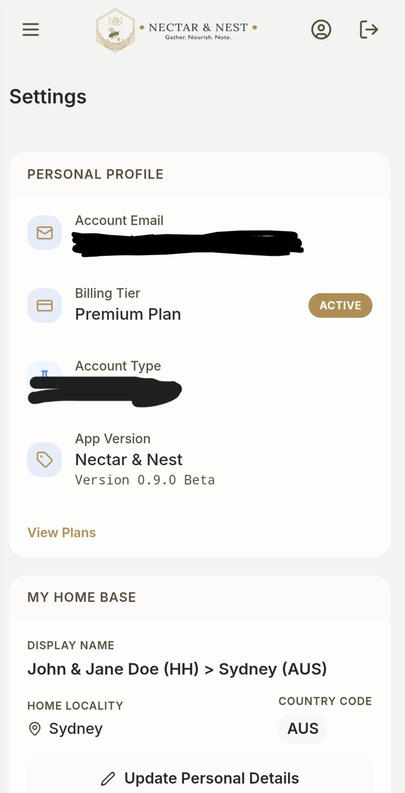
C) Check Your Account Details
11) Click on the profile icon in the top right hand corner and check your email address is correct and your Subscription Plan, Billing option and Account status shows correctly.
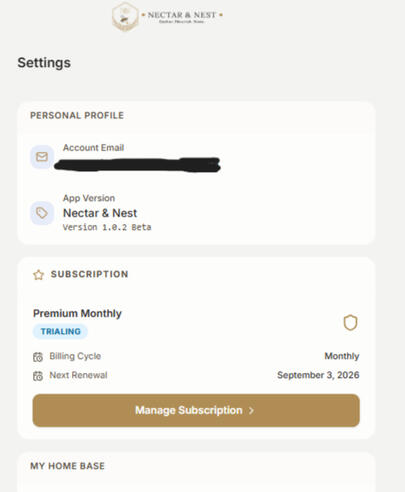
12) Tap the logo at the top to have the app take your back to the home page, or the hamburger icon in the top left to open the side bar navigation menu to make your choice from there.
13) Now you’re ready to explore the app and start adding to your Personal Contact Library and Entertaining Events, and a great time to personalize and set up your Task List ready for your first event. See page "Task List" for more detailsFor quick typing in of new Contacts into your Personal Contact Library, please see notes in our "Personal Contact Library" page for how to do this on a desktop.If the app is working on your phone like a website instead of an app please see our directions below on getting this set up properly.
How to Download and Install App on Android (Google Chrome)
Getting the app onto your Android device takes less than a minute.If the app opens in your web browser, Follow these simple steps to set it as an app on your phone:
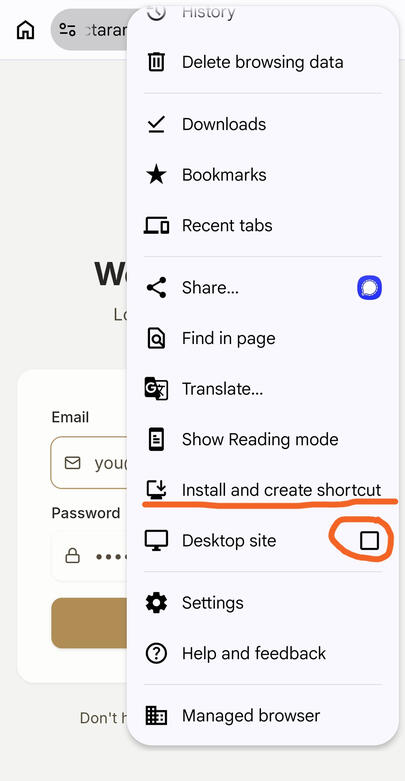
1. Tap the 3 menu dots in top-right of web browser
2. Scroll down to and tap "Install and create shortcut""
3. Make sure the Desktop site box is UNTICKED
4. Confirm "Install"
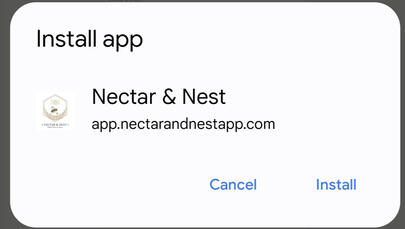
5. This will add this as an app into your phone, feel free to add it to your home screen
Success! The Nectar & Nest icon will now appear on your phone's home screen alongside your other applications.
Simply tap the icon anytime you want to jump back into your hosting dashboard in full-screen mode.
Desktop / Laptop Users:
Prefer a larger screen? You can also log in directly from your computer browser for fast, effortless data entry!
Just use the link below on your laptop to access your app in your web browser

FREQUENTLY ASKED QUESTIONS
Section 1: Subscriptions & Payments
Q: What happens if my subscription payment fails or expires?
A: Don't worry—your data is never deleted. If your subscription becomes inactive, you'll see a Payment Required screen when you sign in. From there, you can quickly update your payment method or manage your subscription. Your entertaining history and saved data remain completely secure and will become fully accessible again as soon as your subscription is reactivated.Q: What happens to my data if I downgrade my subscription plan?
A: Your hard work and hosting history are entirely safe with us. If you downgrade from Premium to Standard, any premium data (like your Menu Planning, Recipes, and curated Task lists) will be safely frozen and tucked away behind the scenes. If you ever choose to re-upgrade in the future, your premium libraries will instantly unlock right where you left them. Your data is never permanently deleted unless you specifically request permanent account deletion.Q: What is your refund and subscription change policy?
A: You can cancel your subscription at any time. If you choose to cancel or downgrade your subscription plan or billing period (Monthly or Annual), you'll continue to enjoy full access to your paid features until the end of your current billing period. Any changes will automatically take effect from your next scheduled renewal date. As your subscription provides immediate access to digital features, refunds are generally not available for partial billing periods or unused time.
UPGRADES - you can upgrade your subscription at any stage, you do not need to wait till the end of your current billing cycle to do this. Cost will be prorated.
Section 2: App Terminology & Features
Q: What do "Allocated" and "Unallocated" mean on my planning sheets?
A: These terms help you beautifully distinguish between your community commitments and personal hosting!
"Allocated" refers to your officially rostered or scheduled entertainment events—gatherings you have formally committed to host within your Interchange Roster and/or any special occassions.
"Unallocated" refers to your personal, self-directed entertaining events—those beautiful gatherings you choose to host purely out of your own desire and heartfelt hospitality.Q: What is a "Collective" event?
A: A Collective event is your way to note those joint or shared gatherings! Whether it’s a potluck, a co-hosted family reunion, or a collaborative friends or workplace feast, a Collective event lets you track multi-host contributions cleanly without cluttering your personal diary view.Q: What happens if I permanently move or change my home Locality?
A: Nectar & Nest moves seamlessly with you. If you update your primary home base in your profile settings, the app will automatically recalculate and re-sort your entire contact library across our local, national, and international Waterfall matrices based on your new home coordinate—no manual retagging required! Just go through and add in your new locals into your Personal Contacts Library so they show up on your app Home Page.
Section 3: Data Ownership, Privacy & Desktop Access
Q: Who owns the data I put into the app?
A: You do, entirely. Nectar & Nest is built with local-to-your-account data isolation. We do not track, scrape, or sell your personal social histories, guest lists, or culinary archives to third parties. It is a dignified, intentional space built with your privacy in mind.
Q: Can app developers and/or admin see any of my app entries?
A: No, Your social and entertaining history belongs to you. Every contact card, custom note, and dietary entry, all your Events, Menus, Task Lists etc. are entirely private and secure to your individual account.
Nectar & Nest is designed so that only you have access to your personal events, contacts, menus or household information. We manage the platform—not your memories.
Q: Can I download or back up my information?
A: Yes! To give you total peace of mind, Nectar & Nest features a built-in Backup System. You can export your entire database as a clean CSV file to your phone or computer, ensuring you always have a permanent copy of your history. You'll find this on the Profile page in the app.Q: Can I access the Nectar & Nest app on my desktop computer?
A: Yes! While the core hosting diary is designed as a mobile-first app for your phone, you can still access our web portal via any desktop browser to manage your account details and/or add contacts and events etc
Section 4: Help & Support
Q: A feature in my app isn’t working properly. What should I do?
A: We are right here to help! If something feels stuck or isn't operating as expected, please reach out to our team at [email protected], or via our "Contact Us" page.

CONTACT US
About Nectar & Nest
Nectar & Nest is an independently developed app, created by a couple of us mums here in New Zealand.It really grew out of our own need for a simple way to remember and organise the gatherings, people and details that are so easily forgotten over time.Thanks for visiting our website
Vicki & Sarah
Contact Us
Have a question about Nectar & Nest?
We’d love to hear from you.Drop us a message below, and one of our team will get back to you as soon as possible.Please make sure to save our email address to your safe list to prevent any email communications going to your Junk/Spam folder. You may want to check there as well.
General Inquiries:
Support & Technical:

TERMS AND PRIVACY
Terms & Conditions
Last updated: October 2026These Terms of Service (“Terms”) govern your access to and use of Nectar & Nest (“Nectar & Nest”, “we”, “us” or “the Service”). By creating an account or using Nectar & Nest, you agree to be bound by these Terms. If you do not agree, please do not use the Service.Nectar & Nest is a digital journal and planning tool for intentional social entertaining, including features such as My Entertaining Diary, your Personal Contacts Library, Menu Planning and Task Lists.1. Your Account
Registration. You access Nectar & Nest by registering an account through our self-registration process. You may also use a third-party sign-in option (such as Google) where offered. You must provide accurate information and keep it up to date. Account security. You are responsible for maintaining the security of your account and login credentials, and for all activity that occurs under your account. If you become aware of any unauthorised use of your account, you should contact us promptly. We may suspend or terminate access if we believe your account has been compromised or these Terms have been breached.2. Acceptable Use
Nectar & Nest is intended for personal, non-commercial social event planning and record-keeping. You agree not to: use the Service for any unlawful, fraudulent or harmful purpose; attempt to access another user’s data or any part of the Service you are not authorised to access; interfere with or disrupt the Service, or introduce viruses or harmful code; copy, scrape, reverse engineer or resell any part of the Service except as permitted by law; or attempt to misuse free trials, subscriptions or other Service functionality. We may suspend or terminate access where we reasonably consider that these Terms have been breached.3. Subscriptions
Paid plans. Nectar & Nest offers Standard and Premium paid subscription plans. Each plan provides access to a different set of features. Not all features may be available on every plan. Billing cycles. Where offered, you may choose between monthly or annual billing. The current prices for each plan and billing cycle are displayed at the time you subscribe or upgrade, and may change from time to time in accordance with these Terms. Automatic renewal. Subscriptions renew automatically at the end of each billing period (monthly or annually) until you cancel. The recurring charge is applied to the payment method you provided through our payment processor. Managing and cancelling. You can manage your subscription — including changing your plan, updating your payment method and cancelling — through the billing portal provided. To avoid being charged for the next billing period, you should cancel before your next billing date. Pricing and plan changes. We may change our subscription prices, plans or features from time to time. Where required by law, we will give you appropriate notice before a pricing change takes effect for your subscription.4. Free Trial
Eligible new subscribers may receive a 30-day Premium free trial, during which they receive access to Premium features. Your selected paid plan (Standard or Premium) will begin automatically at the end of the trial unless you cancel before it ends. Subscription charges for your selected plan will not begin until the trial ends. Free trial eligibility is determined at the time of subscription and may be limited to one trial per account.5. Payments
Subscription payments are processed by Stripe, our third-party payment processor. By subscribing, you authorize Stripe to charge your nominated payment method for recurring subscription fees in accordance with these Terms. Stripe’s own terms and privacy practices apply to the processing of your payment information. We do not store your full card details; these are handled securely by Stripe.6. Cancellation and Refunds
Cancelling your subscription. You may cancel your subscription at any time through the billing portal. Cancellation stops future automatic renewals. Your billing portal will show when your current subscription access ends. No automatic refunds. We do not automatically provide refunds or credits for unused portions of a billing period, except where required by applicable law. If you believe a charge was made in error, please contact us. Consumer rights. Nothing in these Terms excludes, restricts or modifies any right or remedy you may have under applicable law that cannot lawfully be excluded, including rights you may have under New Zealand consumer law.7. Account Deletion
You may permanently delete your Nectar & Nest account at any time through the account-deletion function within the Service. Deleting your account: permanently removes your Nectar & Nest account and the information and content stored within it (such as your events, contacts, notes, menus, photos, places and task information); cannot be undone, and your information cannot be recovered through Nectar & Nest; immediately cancels any active subscription or free trial; and does not automatically entitle you to a refund or credit for any unused portion of your current billing period, except where required by applicable law. Some payment and transaction records may continue to be retained by Stripe for financial, accounting or legal purposes after your account is deleted, in accordance with Stripe’s own retention practices and legal obligations.8. Your Content
Ownership. You retain ownership of any content you enter or upload to Nectar & Nest (for example, events, contacts, notes, menus, photos, places and task information). Licence to us. By submitting content, you grant Nectar & Nest a non-exclusive licence to store, process and display that content solely for the purpose of operating and providing the Service to you. Responsibility for content. You are responsible for the content you enter, and for ensuring you have the right to store and share any information about other people (such as your contacts) in accordance with applicable privacy law. Backup and export. Nectar & Nest may offer tools to export or back up some of your data. We encourage you to keep your own copies of important information, as the Service is not intended as your sole means of data storage and we cannot guarantee data retention in all circumstances.9. Availability
We aim for high availability but do not guarantee uninterrupted or error-free access to Nectar & Nest. The Service may be updated, suspended, discontinued or changed at any time, including features being added, modified or removed. Temporary interruptions may occur while the Service is maintained, updated or changed.10. Third-Party Services
Nectar & Nest relies on certain third-party services to operate, including Stripe (for payment processing) and, where you use it, Google (for sign-in). Third-party services are governed by their own terms and privacy practices, subject to any rights you may have under applicable law.11. Changes to These Terms
We may update these Terms from time to time. Updated Terms apply from the effective date stated in them. Where appropriate or required by law, we will give you notice of material changes.12. Limitation of Liability
To the maximum extent permitted by law, neither Nectar & Nest nor its operators are liable for any indirect, incidental, special or consequential loss or damage, or for any loss of profit, data or goodwill, arising out of or in connection with your use of the Service. Nothing in these Terms excludes, restricts or modifies any right, benefit or remedy that cannot lawfully be excluded, restricted or modified, including any non-excludable right or remedy you may have under New Zealand consumer law.13. Governing Law
These Terms are governed by the laws of New Zealand. You and we submit to the non-exclusive jurisdiction of the New Zealand courts.If you have any questions about these Terms, please contact us through the support option provided within Nectar & Nest.
Privacy Policy
Last updated: August 2026This Privacy Policy explains how Nectar & Nest ("Nectar & Nest", "we" or "us") collects, uses, shares and protects your personal information when you use the Nectar & Nest app and related services (the "Service"). "My Entertaining Diary" is a feature within Nectar & Nest and is not a separate service.Our Terms of Service set out the terms on which the Service is provided.1. Information We Collect
- Account and identity information
When you register, we collect your email address and a name for your account. If you choose Google sign-in, Google provides us with the account information needed to sign you in. Your password is handled by our authentication provider and is not stored in readable form by Nectar & Nest. Your account record also includes your role within the Service and the date your account was created.
- Subscription and billing status information
Nectar & Nest stores limited subscription information so that we can manage your plan, trial and feature access. This may include your plan type, subscription status, billing period and identifiers linking your account to your billing provider. Nectar & Nest does not store your full payment-card details. Payment-card and transaction information is handled by our payment provider, Stripe.2. How We Use Your Information
We use your personal information to:
- authenticate you and manage your account;
- manage subscriptions, trials and feature access;
- send relevant account, feedback and backup notifications where applicable; and
- maintain and improve the Service.
We do not use your personal information for advertising, profiling or analytics-based marketing.3. Sharing and Service Providers
Nectar & Nest does not sell your personal information.
- To operate the Service, your information may be processed by service providers who act on our behalf, including:
- Base44 — application hosting, platform, database, uploaded-file storage and backend functionality;
- Stripe — subscriptions and payment processing;
- Google — optional Google sign-in where you choose to use it; and
email-delivery infrastructure used by the Service to send notifications.
These providers process information in connection with the services they provide to Nectar & Nest and may also handle information in accordance with their own terms and privacy policies. We do not make claims about their internal retention or processing beyond what is described here.5. Data Storage and Security
Nectar & Nest uses Base44 as its application and hosting platform. We take reasonable steps to protect your personal information using the safeguards available through our service providers.
No method of transmission or electronic storage is completely secure. While we work to protect your information, we cannot guarantee absolute security.6. Retention
We retain your information while your account is active, or for as long as needed to provide the Service, unless you delete information or your account.
Certain information may remain where it is retained by service providers for legitimate operational, financial, accounting or legal purposes — for example, payment and transaction records retained by Stripe.7. Account Deletion and Uploaded Files
You can permanently delete your account through the Service. Deleting your account removes your Nectar & Nest account and the app data and records controlled by Nectar & Nest.
- Uploaded files: when your account is deleted, the database records and references associated with your uploaded photos and screenshots are removed. However, Nectar & Nest does not currently have a facility to directly delete the underlying uploaded files from platform-managed storage. Uploaded files may therefore remain in platform-managed storage after account deletion, subject to the platform provider's retention practices.
- Billing records: Stripe may retain payment and transaction records where required for financial, accounting or legal purposes, even after your account is deleted.8. Your Privacy Rights
Under the New Zealand Privacy Act 2020, you have the right to request access to and correction of your personal information.
Within the Service, you can also:
- edit or delete much of your information yourself;
- use the available backup and export functionality to keep your own copy; and
- permanently delete your account through the app.
To make a privacy request, or to ask a question about how your personal information is handled, please contact us at [email protected].9. Cookies and Tracking
Nectar & Nest does not use advertising or analytics tracking cookies within its own app functionality.
Necessary authentication, session or operational technologies may be used to provide and secure the Service. We do not make claims about platform-level technologies that may be used internally by our hosting providers.10. Changes to This Privacy Policy
We may update this Privacy Policy from time to time. We will communicate material changes where appropriate or required by law. The updated Privacy Policy will apply from the effective date stated in it.11. Contact
For privacy questions, privacy requests or general enquiries, please contact:
[email protected]For technical support, you may also contact [email protected].